Overview
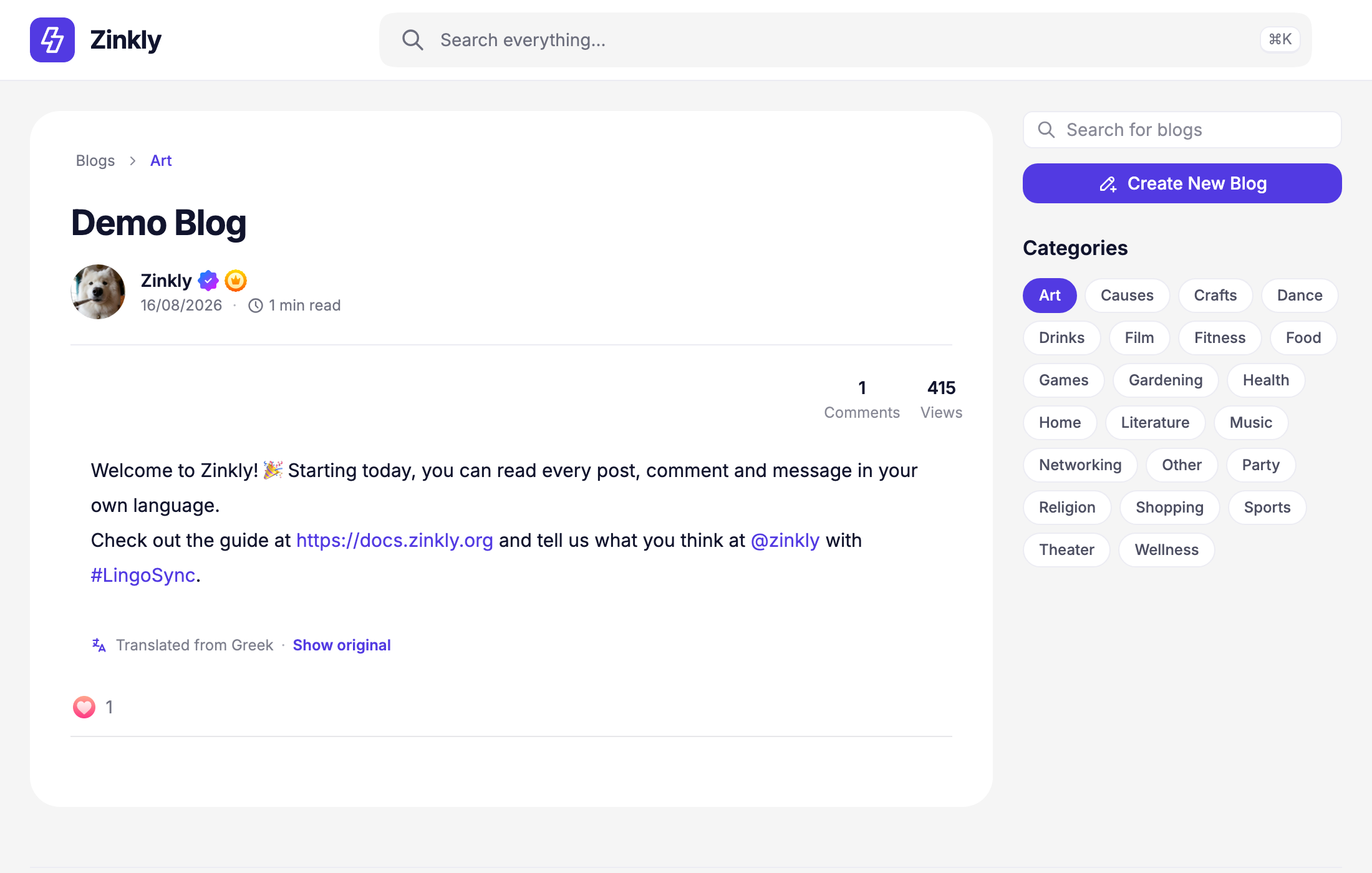
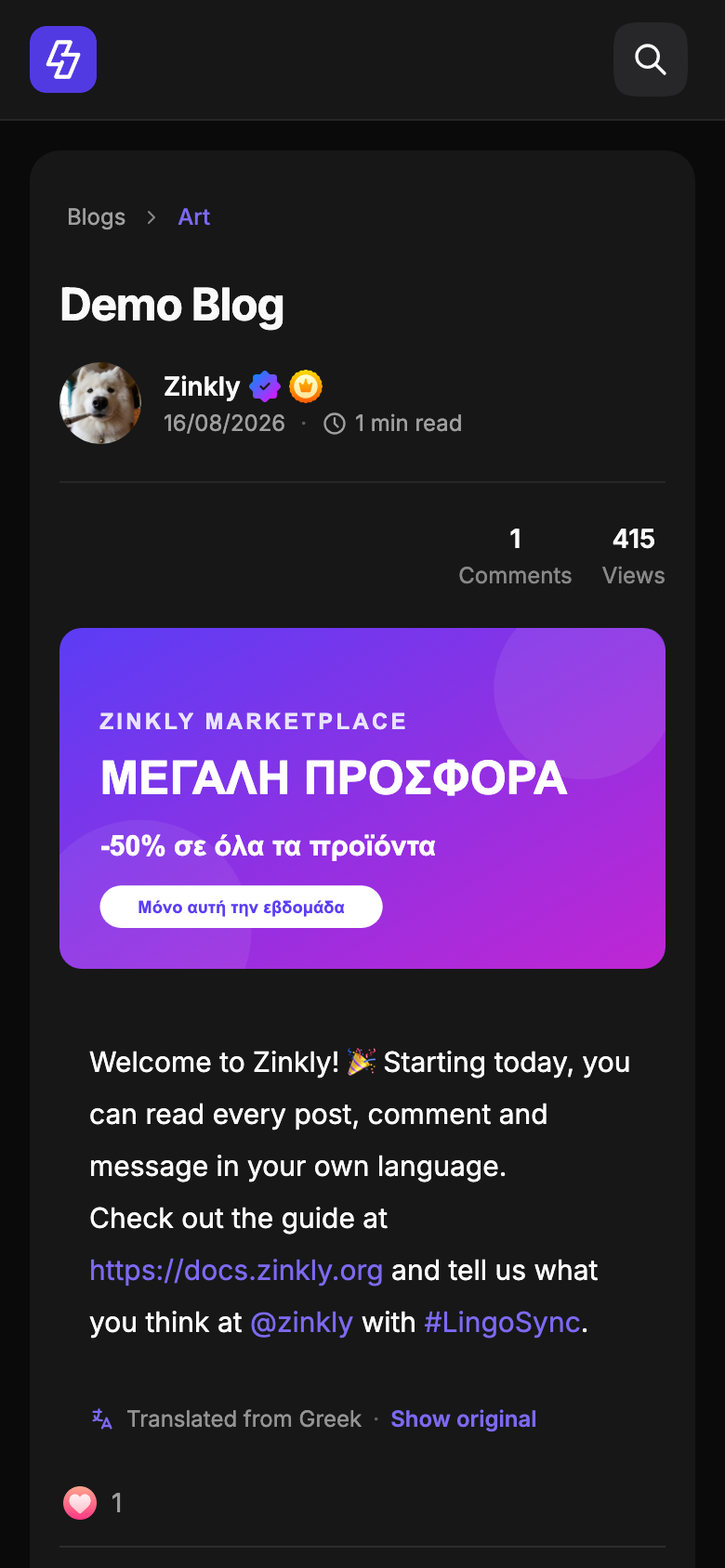
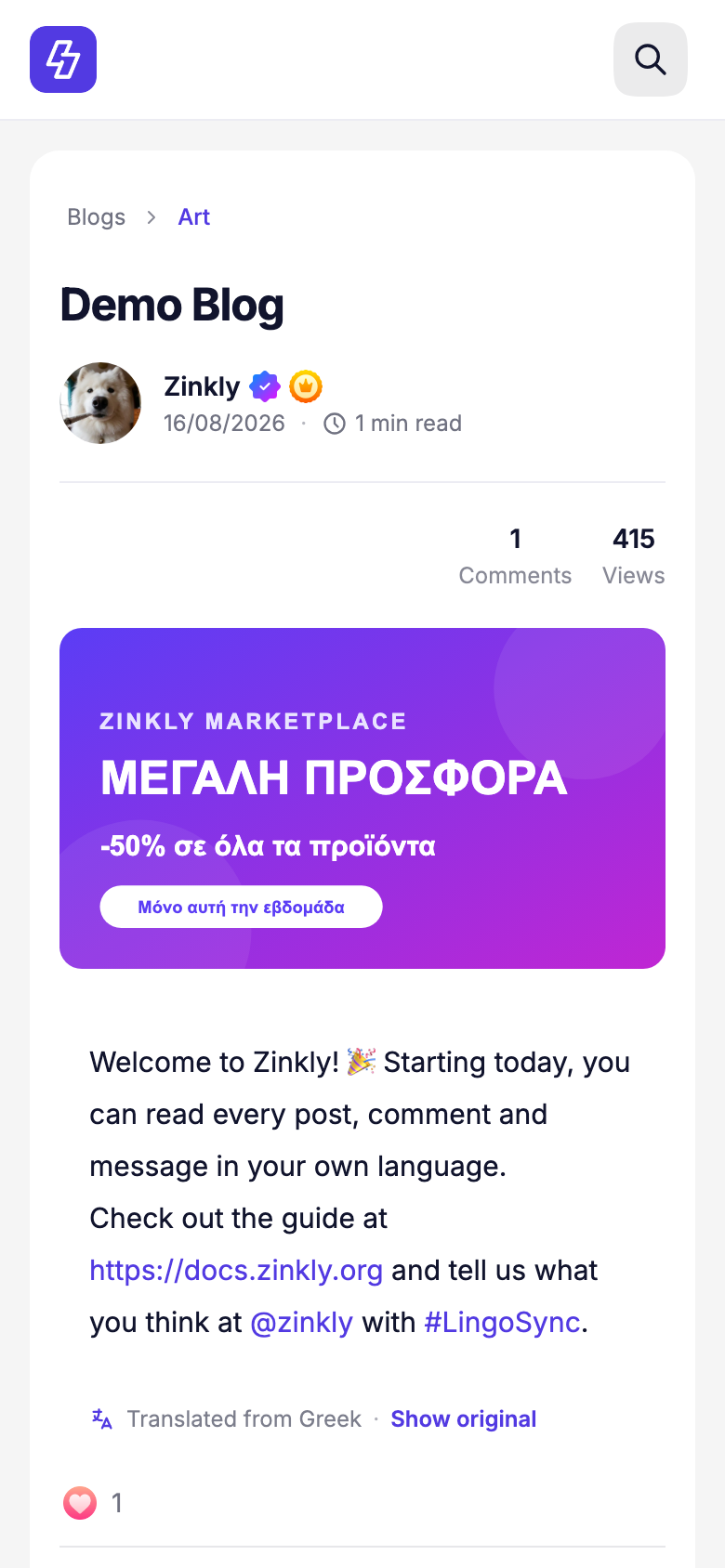
LingoSync adds AI translation to your whole Sngine community. A member taps Translate (or content is translated automatically as they scroll) and reads it in their own language, with a clear "Translated from Greek · Show original" line under it. Links, @mentions, #hashtags and emojis stay exactly as they were.
Your API key never leaves your server. Every request is checked with Sngine's own privacy rules, every result is cached so you never pay twice for the same text, and you control the budget from AdminCP.
Highlights
- Smart AI Translation Engine – detects the language automatically, keeps links, mentions, hashtags and emojis, and never translates the same thing twice.
- VisionAI – reads and translates the text in images, screenshots, posters and infographics, and describes images in the reader's language.
- Translate Anywhere – posts, comments and replies, Groups, Pages, Events, Marketplace, blogs, profile bios, messages, group chats, forums and search.
- Privacy-first – members can only translate what they are allowed to see.
- Cost control – caching, per-member rate limits and daily, weekly, monthly and yearly budgets.
- Built for Sngine 5 – its own AdminCP page, the Nova design, light and dark mode, phone and desktop.
Perfect For
- International and multilingual communities
- Marketplaces with buyers and sellers in different countries
- Groups and forums where members write in many languages
- Communities that share screenshots, posters and infographics
LingoSync installs in about 5 minutes. Follow the Installation guide, or see What's New in 1.4.
What's New in 1.4 Latest
Released October 27, 2026. LingoSync 1.4 is rebuilt for Sngine 5 and brings three big feature sets: the Smart AI Translation Engine, VisionAI Image Translation and Translate Anywhere.
Smart AI Translation Engine
LingoSync detects the original language on its own and shows it under every translation. Members switch between the original and the translation with one tap. Links, @mentions, #hashtags, emojis and line breaks are kept exactly, and content that is already in the reader's language is left alone.
VisionAI Image Translation
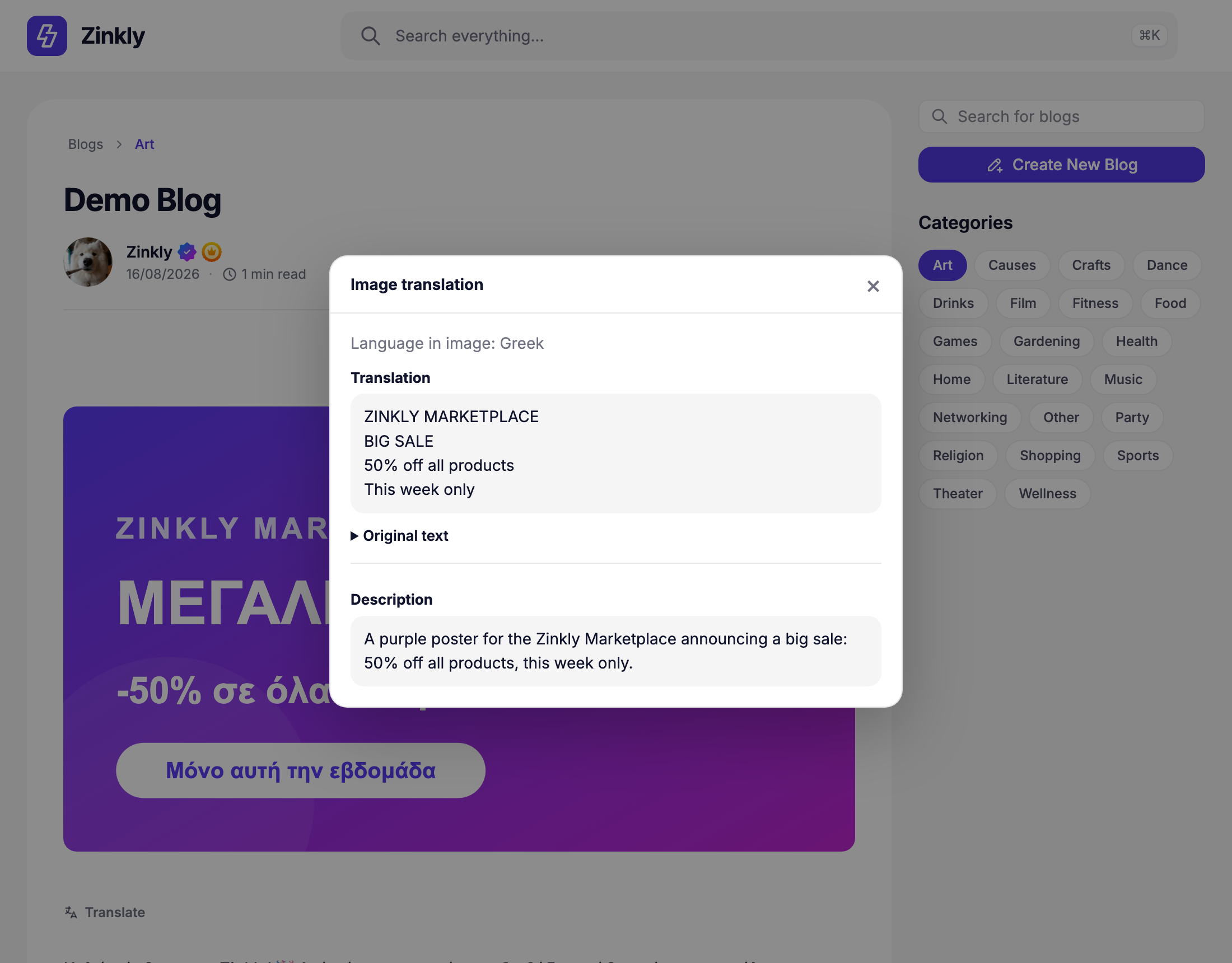
A small button on photos reads the text in the image (screenshots, posters, infographics, signs), recognizes its language and translates it. Members can also get a short description of the image in their language, which LingoSync also uses as the image's alt text.
Translate Anywhere
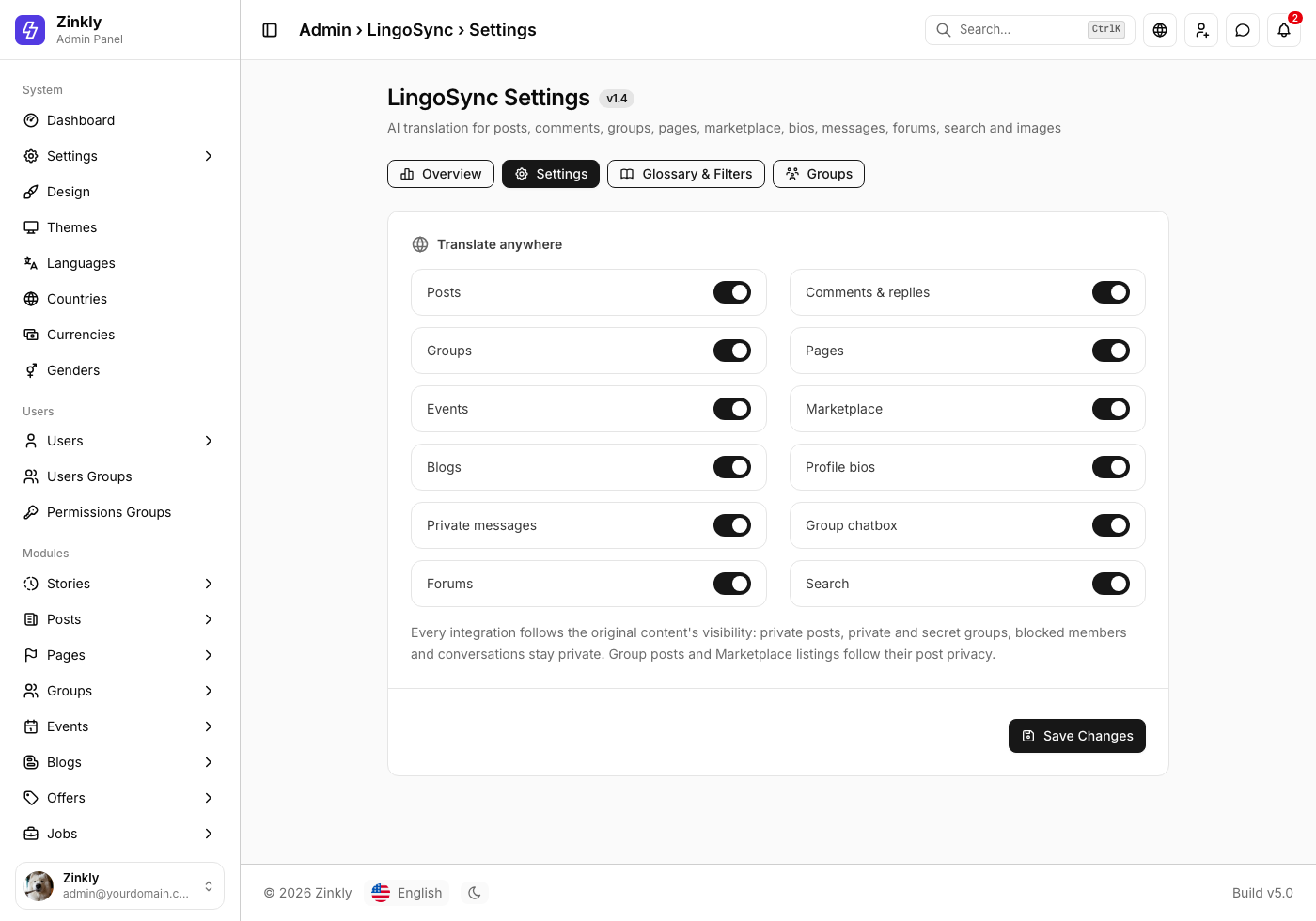
Translation now covers posts, comments and replies, Groups, Pages, Events, Marketplace listings, blog articles, profile bios, private messages, group chats, forum threads and replies, and search terms. Each one has its own switch.
A new AdminCP page
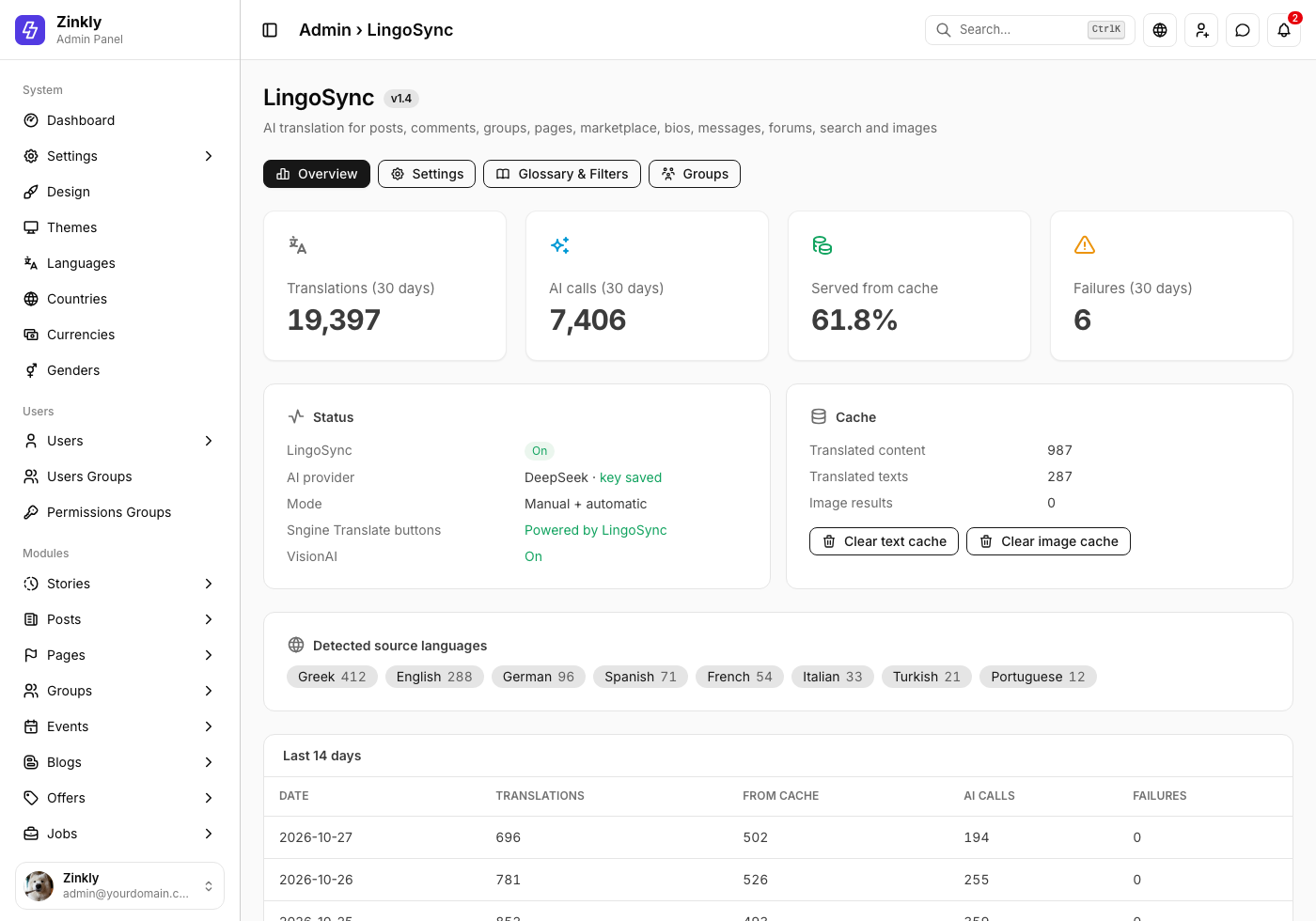
LingoSync now has its own page in AdminCP (left menu, under Reach): usage for the last 30 days, the share served from cache, detected languages, settings, glossary and blocked words, and per-group modes.
Made for phones and dark mode
Everything follows the Nova theme: the translation line, the buttons and the VisionAI window look right in light and dark mode, on phones and on desktop.
One update takes 1.0 – 1.3 straight to 1.4 and keeps your settings, API keys, statistics, custom translations and blocked words. See Updating.
System Requirements
- Sngine 5.x with the Nova theme (the Sngine 5 default theme).
- PHP 8.1 or newer with the
cURLandfileinfoextensions (both standard on Sngine hosting). - MySQL / MariaDB – LingoSync adds its own
lingosync_*tables and settings rows. Your content tables are never changed. - An AI provider key – OpenAI or DeepSeek. Any OpenAI-compatible API also works (set its address as the endpoint).
- A way to run one command (SSH or your host's terminal) for the patcher. No SSH? The six changes can also be made by hand.
LingoSync 1.4 is for Sngine 5. Sites on Sngine 4.5 with the Default, Diamond Pro, Elengine or Xngine themes can keep using LingoSync 1.3.
Installation Guide
New installation of LingoSync 1.4. Updating an older version? Go to Updating.
Step 1 – Upload the files
Unzip lingosync-for-sngine.zip. Upload everything inside the Script/ folder to your Sngine root (the folder that contains admin.php), keeping the folder structure. LingoSync only adds new files; it does not replace any Sngine file.
includes/lingosync.php
includes/lingosync/admin.php
includes/lingosync/install.sql
includes/lingosync/patch.php
includes/ajax/lingosync/translate.php
includes/ajax/lingosync/vision.php
includes/ajax/admin/lingosync.php
includes/assets/js/lingosync/lingosync.js
includes/assets/js/lingosync/admin.js
includes/assets/css/lingosync/lingosync.css
content/themes/nova/templates/admin.lingosync.tpl
content/themes/nova/templates/__lingosync_assets.tpl
The package also contains Updates/ (update guides for every older version), How to Install.txt and Changelog.txt.
Step 2 – Import the database
- Open phpMyAdmin and select your Sngine database.
- Go to Import and choose
includes/lingosync/install.sql. - Click Go.
It creates the LingoSync tables and default settings. It is safe to run more than once and never overwrites settings you already saved.
mysql -u DBUSER -p DBNAME < includes/lingosync/install.sqlStep 3 – Connect LingoSync to Sngine
LingoSync needs six small, clearly marked hooks in Sngine's own files. The patcher adds them, checks every file first, keeps a backup of each changed file in content/backups/lingosync/ and clears the template cache. From your Sngine root:
php includes/lingosync/patch.php --check
php includes/lingosync/patch.php
Every line should say PATCHED or OK. A file that says FAILED is not changed; make that change by hand.
The six changes (for a manual install)
includes/traits/translations.php– runs Sngine's translator on LingoSync when "LingoSync AI" is the provider.admin.php– the AdminCP › LingoSync page.content/themes/nova/templates/_admin_header.tpl– the LingoSync link in the AdminCP menu.includes/ajax/admin/settings.php– accepts LingoSync as a translation provider.content/themes/nova/templates/admin.settings.posts.tpl– adds "LingoSync AI" to Settings › Posts › Translation Provider.content/themes/nova/templates/_js_files.tpl– loads LingoSync for members while it is on.
The exact code for each change is in How to Install.txt (Manual installation).
Step 4 – Settings
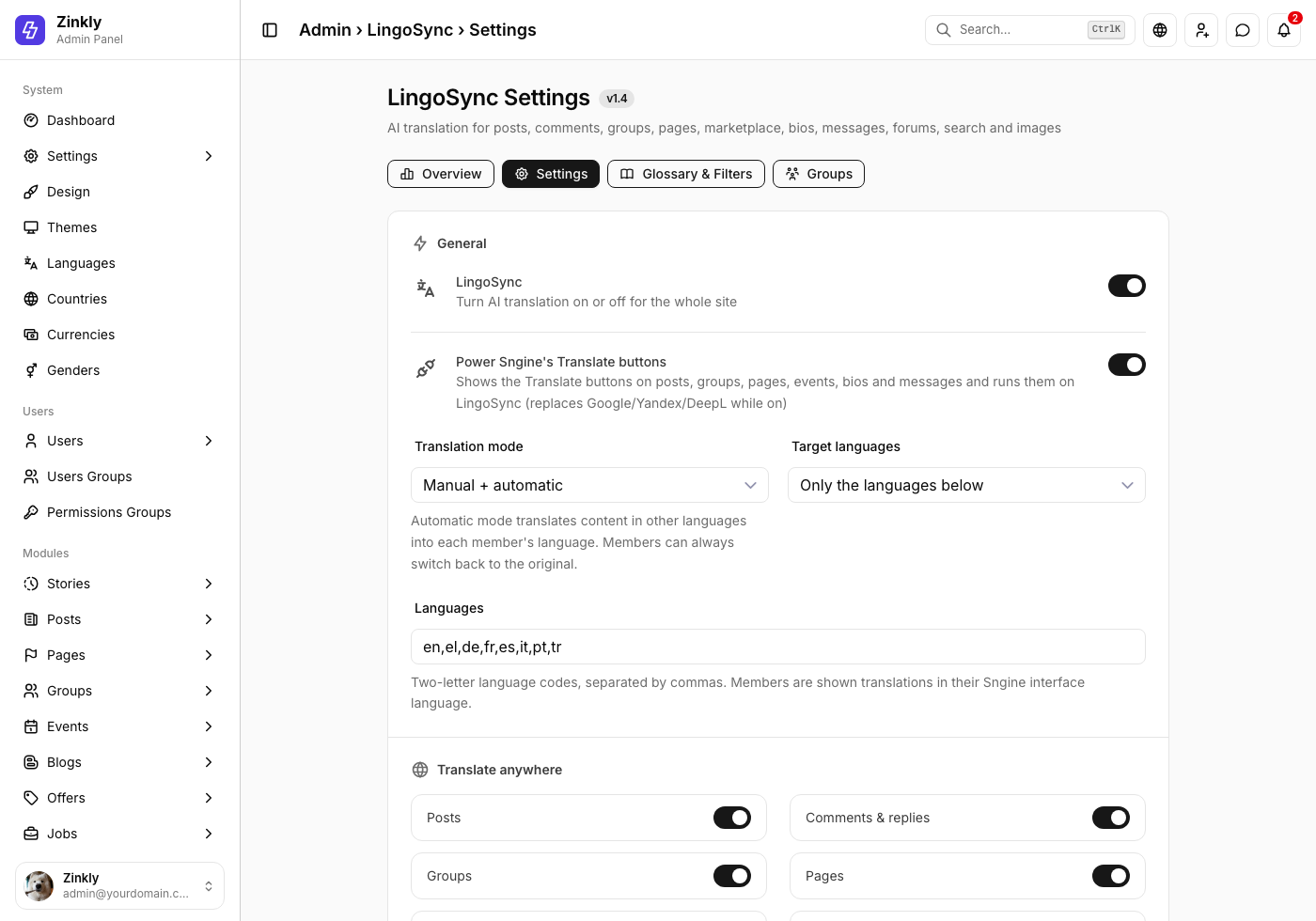
Go to AdminCP › LingoSync › Settings (left menu, under Reach).
- Turn on LingoSync.
- Choose the AI provider, paste your API key, click Save Changes, then Test connection.
- Pick your Target languages (for example
en,el,de,fr,es) or Any member language. - Keep Power Sngine's Translate buttons on, so Sngine's own Translate buttons run on LingoSync.
- Choose what to translate under Translate anywhere.
- Optional: turn on VisionAI and try Test VisionAI with an image.
Step 5 – Done
Open a post written in another language and tap Translate. You should see the translation with "Translated from …" and Show original under it.
Every member gets translations in their own Sngine interface language. Check usage and costs any time in AdminCP › LingoSync.
Updating LingoSync
One update takes LingoSync 1.0, 1.1, 1.2 or 1.3 straight to 1.4. You keep your settings, API keys, usage statistics, custom translations, blocked words and group modes. The translation cache starts fresh, because 1.4 also stores the detected language.
Update from 1.0 – 1.3
- Back up your database and files.
- Update Sngine to 5.x first if you haven't yet. This replaces the Sngine files that LingoSync 1.0 – 1.3 had changed.
- Delete the old LingoSync files listed in
Updates/Update 1.3 to 1.4/How to Update.txt(old endpoints, the old script and stylesheet, and the old theme templates). - Upload everything inside
Script/. - Import
Updates/Update 1.3 to 1.4/lingosync_update_1.4.sql. - Run the patcher:
php includes/lingosync/patch.php. - Open AdminCP › LingoSync › Settings, review the new options and click Save Changes.
A Sngine update can replace the files the patcher changed. Run
php includes/lingosync/patch.php again afterwards; it only adds what is missing.
Rolling back
Turn LingoSync off in its settings (this gives Sngine's Translate buttons back to your previous provider), restore the files from content/backups/lingosync/, and remove the LingoSync files from Step 1.
All Features
Everything LingoSync 1.4 does, at a glance.
Automatic language detection
No need to know the original language. LingoSync detects it and shows it under every translation.
Original ↔ translation
"Show original" and "Show translation" switch back and forth instantly, without another request.
Keeps what matters
Links, e-mails, @mentions, #hashtags, emojis and line breaks are never changed, and links stay clickable.
Smart caching
The same text is never sent twice, unchanged content is never translated again, and edited content is refreshed on its own.
VisionAI
Reads, recognizes and translates the text in images, and describes images in the reader's language.
Translate anywhere
Posts, comments, Groups, Pages, Events, Marketplace, blogs, bios, messages, group chats, forums and search.
Privacy-first
Members can only translate content they can already see. Private groups, private messages and paid posts stay private.
Manual, automatic or both
Tap to translate, translate automatically while scrolling, or both. Each member can turn automatic translation off.
Powers Sngine's own buttons
Sngine's Translate buttons on posts, groups, pages, events, bios and messages run on LingoSync, listed as "LingoSync AI".
Glossary & filters
Your own translations for brand names and phrases, blocked words, Sngine's censored words and optional AI moderation.
Per-group modes
Give a group its own mode: automatic for an international group, off for a language-learning group.
Budgets & rate limits
Daily, weekly, monthly and yearly limits, plus per-member limits for translations and image analyses.
OpenAI, DeepSeek & more
Pick the provider and model, including newer models, or point it at any OpenAI-compatible API.
Nova design
Light and dark mode, phones and desktop, and a dedicated AdminCP page with live statistics.
Smart AI Translation Engine
- Detects the source language in the same AI call as the translation, so it costs nothing extra.
- Shows the original language and a translated indicator – "Translated from Greek" (or "Automatically translated from Greek"), in the reader's language.
- Original ↔ translation – "Show original" / "Show translation" switch instantly.
- Preserves emojis, mentions, links, hashtags and formatting – these never reach the AI as text, so it cannot change or drop them, and line breaks are kept.
- Skips content already in the reader's language – no second translation, no cost.
- Caches to reduce cost – the same text in the same language is never sent to the AI twice.
- Avoids retranslating unchanged content – each piece of content remembers its translation. When the author edits it, the next view translates the new version.
Translation modes
| Mode | What members see |
|---|---|
| Manual | A Translate button; nothing is translated until they tap it. |
| Automatic | Posts, comments, messages and forum posts in other languages are translated as they scroll into view, in small batches. |
| Manual + Automatic | Both: automatic translation, and Translate buttons everywhere else. |
In automatic mode every member can tap "Don't translate automatically" under a translation, and turn it back on the same way.
Translations are stored separately. Posts, comments, messages and every other Sngine table stay exactly as the author wrote them.
VisionAI Image Translation
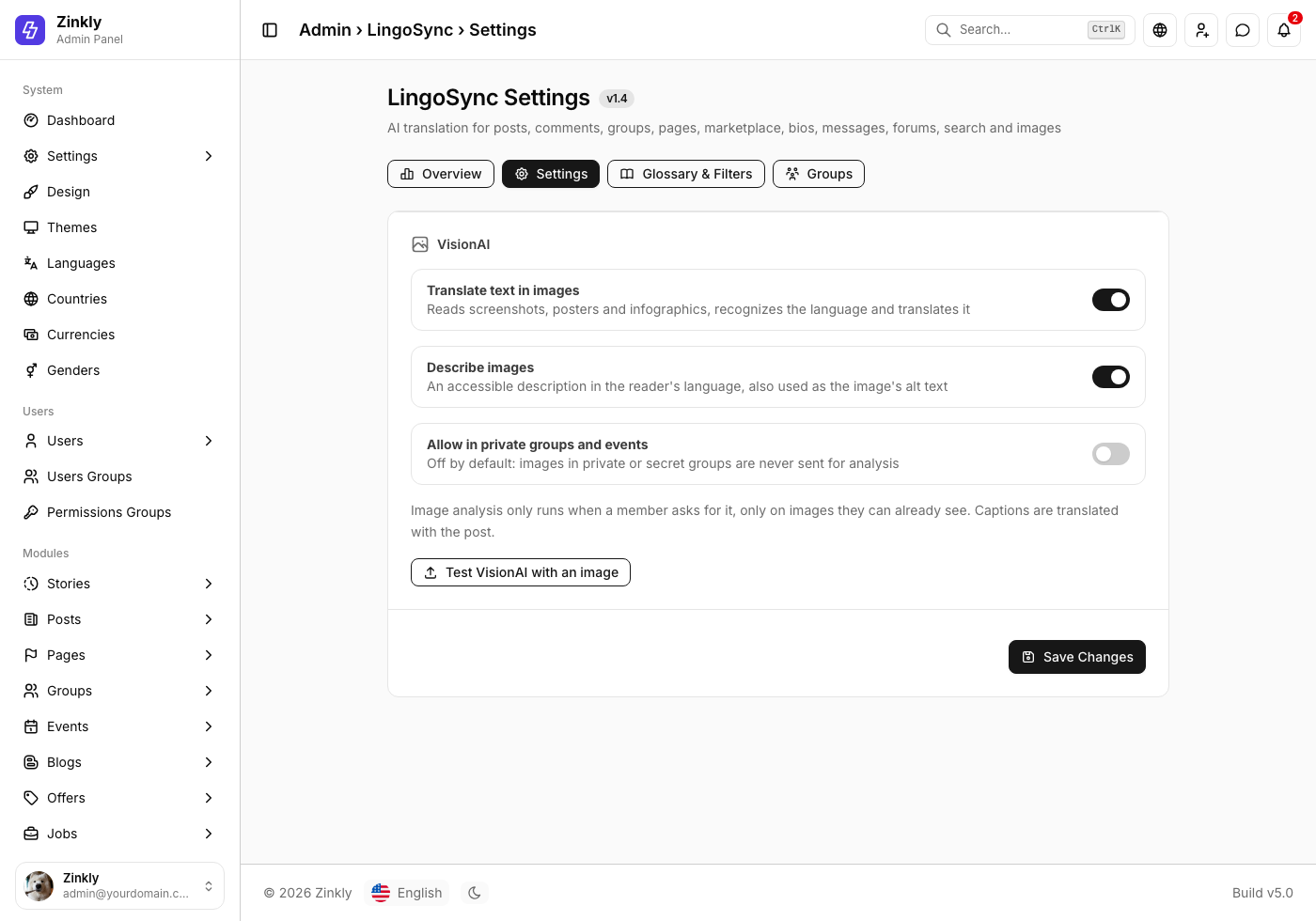
When VisionAI is on, photos in posts get a small button. It opens a window with:
- Text in image – the text in screenshots, posters, infographics, signs and memes, its language, and the translation into the reader's language. The original text is one tap away.
- Describe image – one or two sentences describing the image in the reader's language. The description is also used as the image's alt text for screen readers.
- Captions – the post's own text is translated together with the post.
Optional, and respectful of private content
- Both features are off by default and can be turned on separately.
- Analysis runs only when a member asks, and only on images they can already see.
- Never on paid, subscribers-only or age-restricted posts the member hasn't unlocked.
- Images in private or secret groups and events are never sent unless you turn on Allow in private groups and events.
- Results are cached per image and language, and images count against their own per-member limit.
Translate Anywhere
Each content type has its own switch in AdminCP › LingoSync › Settings › Translate anywhere.
| Content | What is translated | Default |
|---|---|---|
| Posts | Post text, plus the title of funding, offer, job and course posts | On |
| Comments & replies | Comments and replies on posts and photos | On |
| Groups | Group name and description (posts inside groups follow the Posts switch) | On |
| Pages | Page name and description | On |
| Events | Event name and description | On |
| Marketplace | Listing name and description | On |
| Blogs | Article title and text | On |
| Profile bios | The "About" text on profiles | On |
| Private messages | Messages in conversations the member is part of | Off |
| Group chatbox | Group, page and event chats | Off |
| Forums | Forum threads and replies | Off |
| Search | "Translate my search" turns a search term into your site's main language | Off |
Members see translations in their Sngine interface language. You can allow only the languages you choose, or any member language.
Privacy & Permissions
The browser only ever sends the id of the content. LingoSync loads the text on your server, with Sngine's own rules, before anything is sent to the AI:
- Post privacy – Public, Friends and Only me are respected.
- Private and secret groups and events – only approved members can translate their content.
- Blocked members – content from people who blocked each other is never translated.
- Private messages – only the people in the conversation can translate it.
- Paid, subscribers-only and age-restricted posts – translated only once the member can see them.
- Your API key stays on your server. It is never sent to the browser and never written to logs.
Older versions accepted any text and any image path from the browser. In 1.4 that is no longer possible, so nobody can use your AI key for their own text.
AI Engine & Limits
Provider & models
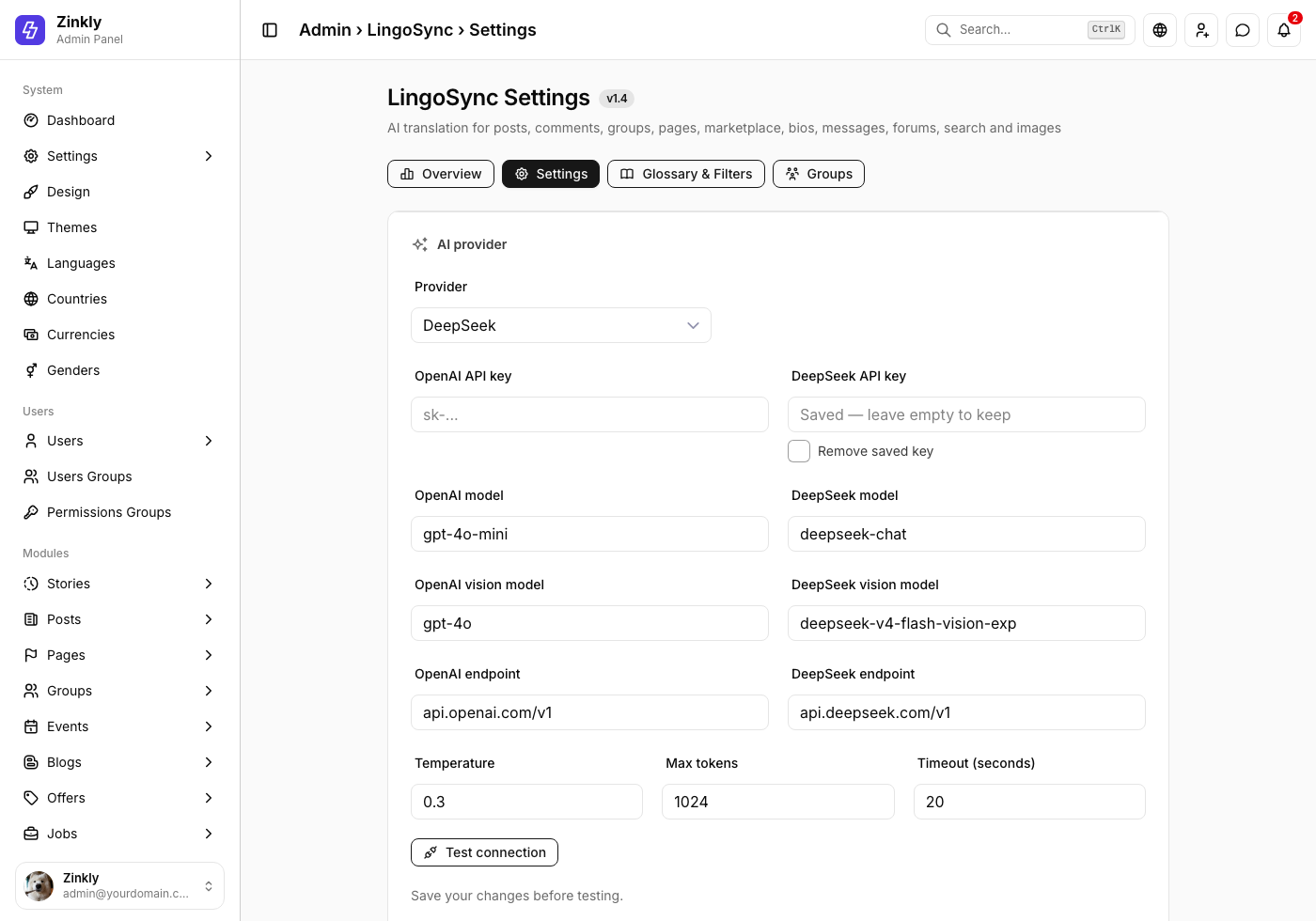
OpenAI or DeepSeek, each with its own key, text model, vision model and endpoint. Newer models such as the gpt-5 family work too.
Any compatible API
Point the endpoint at any OpenAI-compatible service. https is used by default; type http:// only for a self-hosted server.
Site budget
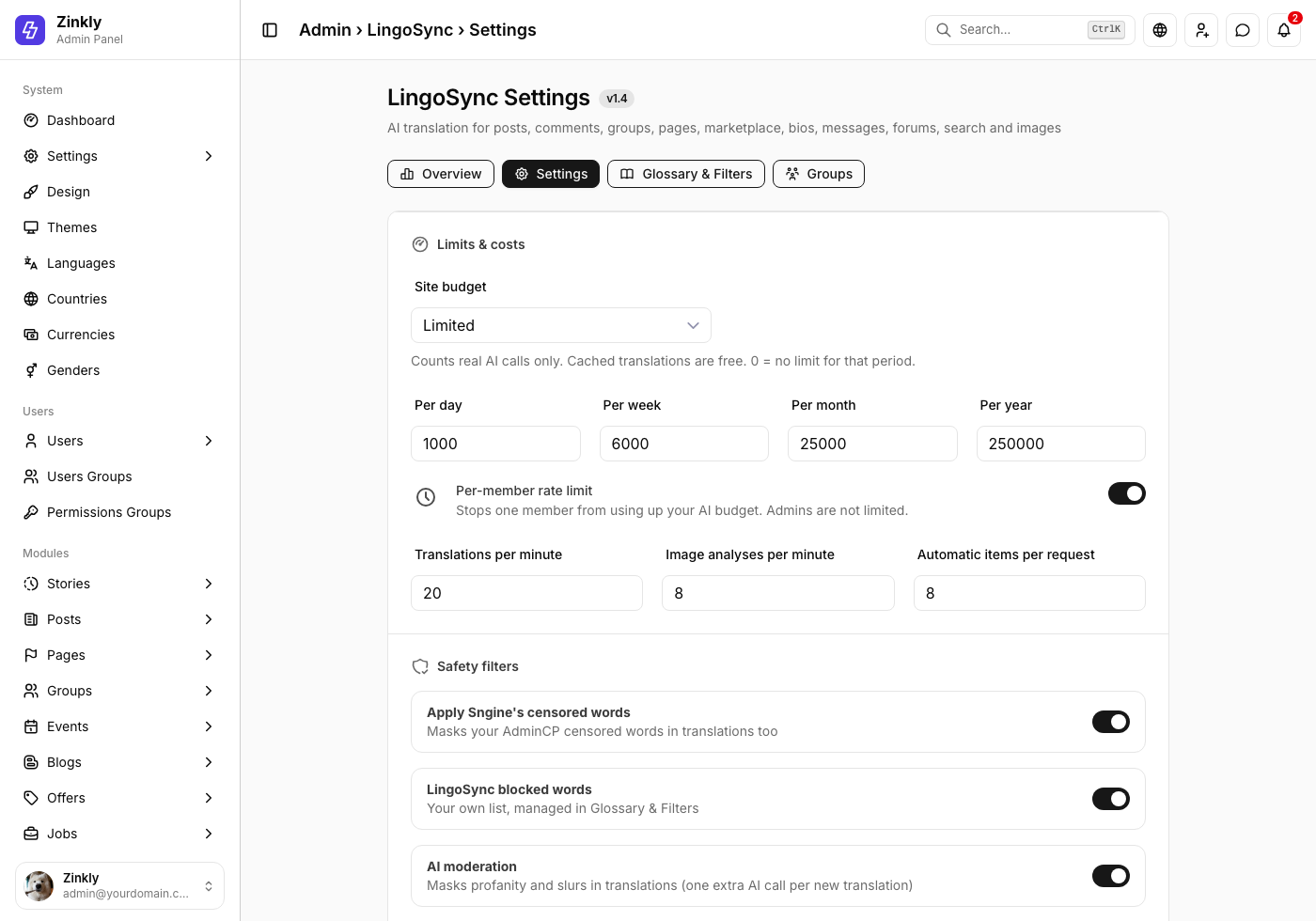
Daily, weekly, monthly and yearly limits on real AI calls. Cached translations are free and never count.
Per-member rate limit
Translations and image analyses per minute (20 and 8 by default), so one member can't use up your budget. Admins are not limited.
Automatic batches
Automatic mode sends visible items together (1 – 20 per request, 8 by default) and stops when a limit is reached.
Tuning
Temperature, maximum tokens and a timeout, so a slow provider can't keep members waiting.
AdminCP Tour
Everything lives in AdminCP › LingoSync:
- Overview – translations, AI calls, the share served from cache and failures for the last 30 days, a 14-day table, usage by content type, detected source languages, and buttons to clear the text or image cache.
- Settings – on/off, mode, languages, what to translate, AI provider, VisionAI, limits and safety filters, with Test connection and Test VisionAI with an image.
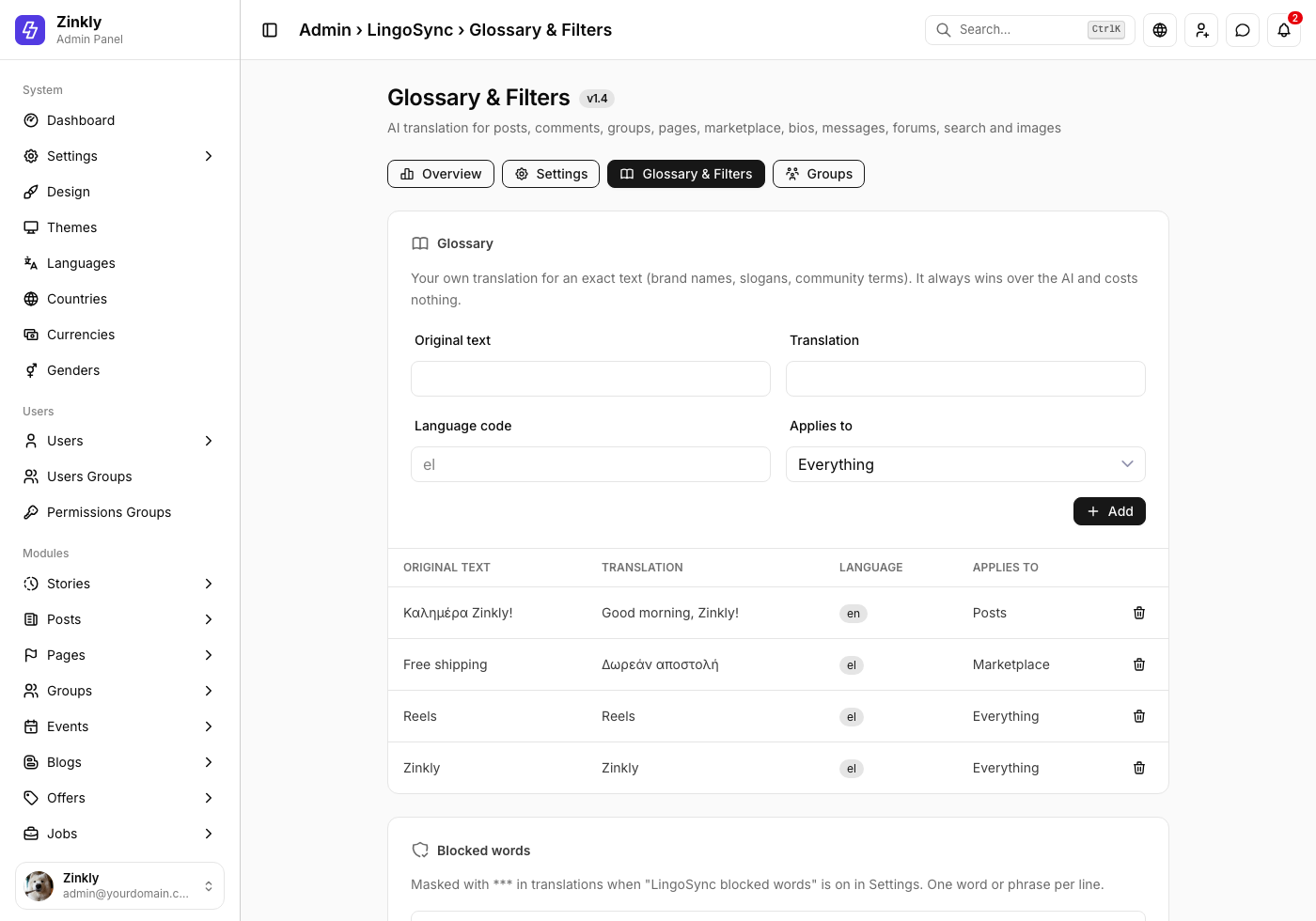
- Glossary & Filters – your own translations for exact texts (brand names, slogans, community terms), per language and content type, and your blocked words.
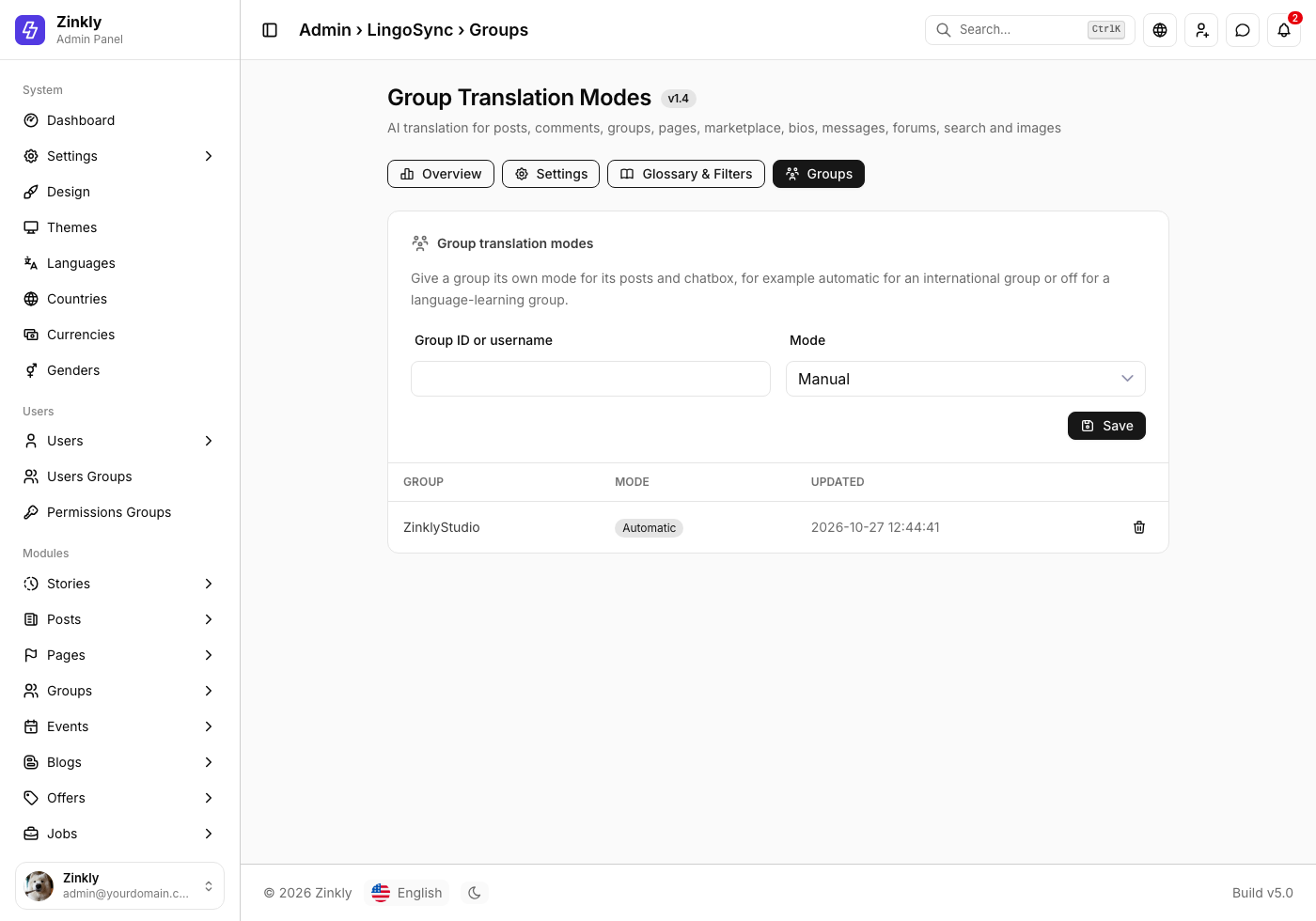
- Groups – a translation mode per group: follow the site, manual, automatic, both, or off.
Changelog
All notable changes to LingoSync, newest first.
Update 1.4
LatestOctober 27, 2026Added
- Full compatibility with Sngine 5 and the Nova theme.
- Smart AI Translation Engine: automatic source-language detection, shown under every translation.
- "Show original" / "Show translation" toggle on every translation.
- Emojis, @mentions, links, #hashtags and line breaks are kept exactly.
- Content already in the reader's language is detected and left alone.
- Per-content cache: unchanged content is never translated again, edited content is refreshed automatically.
- VisionAI: translate the text in images, screenshots, posters and infographics, with language recognition.
- VisionAI: describe images in the reader's language, also used as the image's alt text.
- Translate Anywhere: Groups, Pages, Events, search terms and group/page/event chats, next to posts, comments, Marketplace, blogs, bios, messages and forums.
- Powers Sngine's own Translate buttons, and "LingoSync AI" in Settings › Posts › Translation Provider.
- Its own AdminCP page: Overview, Settings, Glossary & Filters and Groups.
- Per-member rate limits for translations and image analyses.
- Members can turn automatic translation off and on again.
- Support for newer OpenAI models and any OpenAI-compatible API.
Security
- Every request is checked with Sngine's privacy rules: post privacy, private and secret groups and events, blocked members, conversations and paid posts.
- The browser sends only a content id; arbitrary text and image paths are no longer accepted.
- Images in private groups and events are never analyzed unless the admin allows it.
Changed
- No Sngine file is replaced anymore: six small hooks are added by a patcher, with backups.
- The settings moved from AdminCP › Settings › LingoSync to AdminCP › LingoSync.
Update 1.3
September 16, 2026Added
- Ability for the admin to select custom languages to translate.
- Ability for admins to add Custom Translations.
- Translation for Community Chats.
- Flag & Mask Abusive Language.
- Option to also apply Sngine's Censored Words list.
- Ability for admins to manage Blocked Words.
Improved
- VisionAI security.
Update 1.2 – Vision & Moderation
August 30, 2026Added
- Images Translation.
- Forum Translation.
- AI Security.
- Flagged Word Masking.
- DeepSeek "v4-flash-vision-exp" model support.
- Full compatibility with Sngine 4.5.
Improved
- AdminCP dashboard with Vision & Moderation stats.
- Caching engine now supports image translation results.
Fixed
- Minor edge-case issues with infinite scroll and automatic mode.
Update 1.1
August 19, 2026Added
Update 1.0
August 14, 2026Added
- Initial release.
Frequently Asked Questions
Quick answers to the most common questions about LingoSync.
Which Sngine version and theme do I need?
LingoSync 1.4 needs Sngine 5.x with the Nova theme. Sngine 4.5 sites with the Default, Diamond Pro, Elengine or Xngine themes can use LingoSync 1.3.
Does LingoSync change my posts, comments or messages?
Never. Translations are stored in LingoSync's own tables. Your content stays exactly as it was written.
Do I need both an OpenAI and a DeepSeek key?
No. You only need a key for the provider you choose. For VisionAI, pick a vision model your provider supports.
Which language do members see?
Their Sngine interface language. You can allow only the languages you pick, or any member language.
Will automatic mode use a lot of API credits?
Much less than before. LingoSync skips content already in the reader's language, translates each item only once per language, and serves repeats from the cache. Your site budget and per-member limits cap the rest.
Can members translate content from private groups or someone else's messages?
No. Every request is checked with Sngine's own privacy rules first. See Privacy & Permissions.
Is VisionAI always on?
No. It is off by default, runs only when a member asks, and never analyzes images from private groups or events unless you allow it.
Does LingoSync replace Sngine's Google / Yandex / DeepL translator?
While "Power Sngine's Translate buttons" is on, Sngine's own buttons run on LingoSync. Turn it off, or turn LingoSync off, and they go back to your previous provider.
Does LingoSync change Sngine core files?
It adds six small, clearly marked hooks and replaces nothing. The originals are backed up to content/backups/lingosync/. After a Sngine update, run php includes/lingosync/patch.php again.
How do I get support?
Contact our support team at portasale.com/u/zinklystudio. Please include your purchase ID and a detailed description of your issue.
Troubleshooting
"Translation is temporarily unavailable"
The AI provider refused the request. Click Test connection in AdminCP › LingoSync › Settings to see its exact answer. Common causes: a wrong API key, a model name your account can't use, or no credit left (DeepSeek answers "Insufficient Balance").
There is no LingoSync link in AdminCP
The patcher hasn't run, or a Sngine update replaced the patched files. Run php includes/lingosync/patch.php again.
Members don't see any Translate buttons
Check that LingoSync is on, that "Power Sngine's Translate buttons" is on, and that the content type is switched on under Translate anywhere. Then clear your browser cache.
"The translation limit has been reached"
Your site budget for the day, week, month or year is used up. Raise it under Limits & costs, or wait for the next period. Cached translations keep working.
"You are translating too fast"
The member hit the per-minute limit. It resets within a minute; you can raise it under Limits & costs.
Contact our support team at portasale.com/u/zinklystudio – we're happy to help.